Observability Matters: Why OpenTelemety Is The Way Ahead?

What Happens When Your System Breaks and You Don’t Know Why? Imagine you're trying to withdraw cash from an ATM. It fails. You get a message: “Transaction declined.” That’s monitoring, you know something went wrong. But what exactly? Was it insufficient funds? A networking issue? System timeout? To answer that, you need observability.
Monitoring and Observability
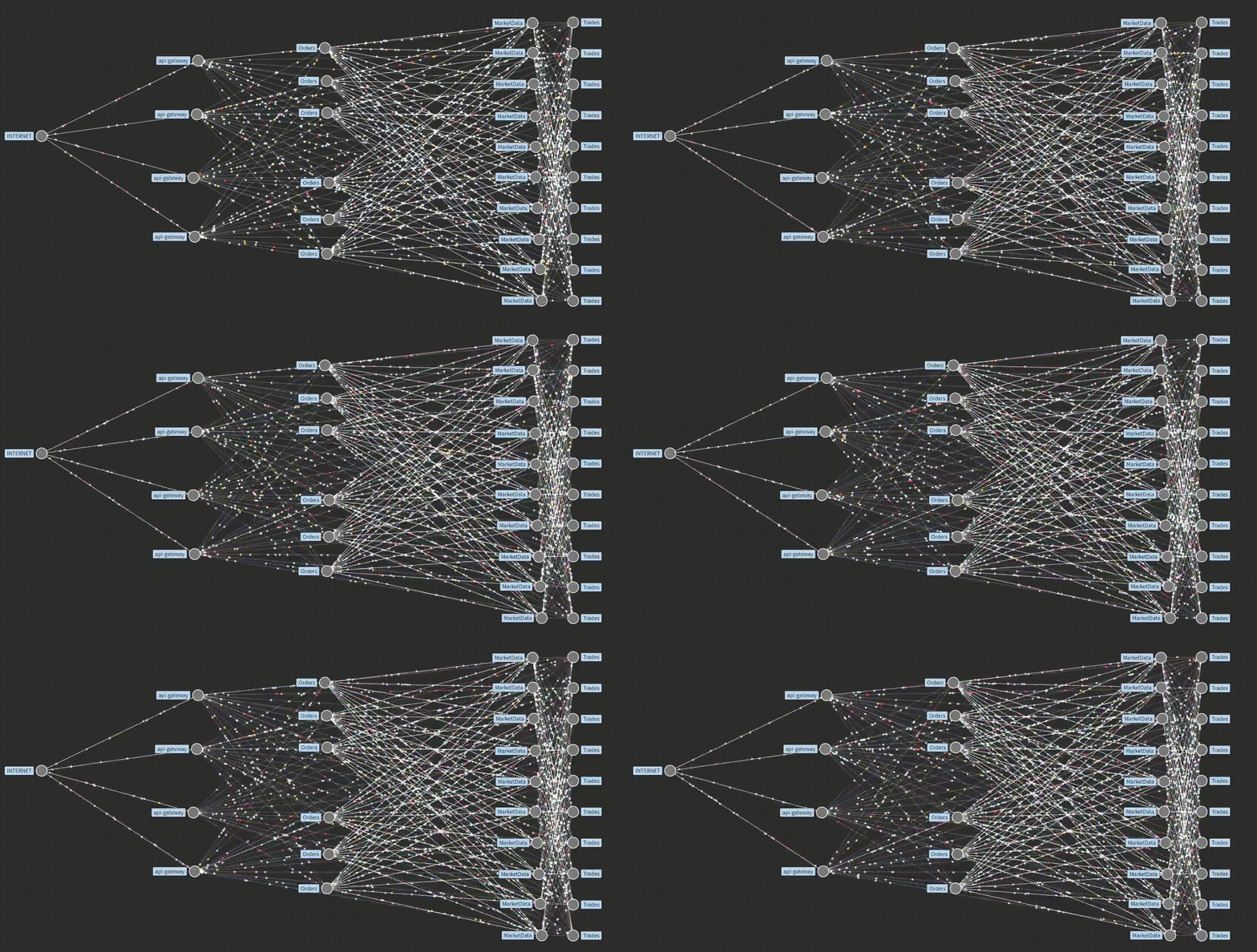
In the early days, teams checked server health. A green light meant “everything’s fine.” But cloud-native systems changed the game. Applications now run as microservices—hundreds of loosely connected pieces. They may use different languages, frameworks, or even deployment models (containers, serverless, on-prem, cloud). This brought reliability. It also brought complexity.
From Servers to Services: Modern applications don't live on one box. A single user request might trigger 10+ internal service calls. If something fails along that chain, the cause isn’t always obvious. Traditional monitoring, built around static thresholds and predefined alerts, can’t keep up.
So, What’s the Difference?
Monitoring tells you what is wrong, often in known scenarios. For example, "Memory usage > 90%" triggers an alert.
Observability lets you ask why it's wrong, even when you didn’t know to ask the question beforehand.
Think of monitoring as a dashboard with gauges. Observability is having the tools to investigate what happened behind those gauges—logs, traces, metrics—all working together to let you explore system behavior.
Why You Need Both
Monitoring is still necessary. It’s good at spotting known failure conditions. But in distributed systems, many problems are new or unexpected. That’s where observability matters. To build resilient systems, teams must:
Collect rich telemetry (logs, metrics, traces) from every service.
Understand how services talk to each other.
Trace requests end-to-end.
Explore unknowns in real time.
Don't think in terms of Observability vs. Monitoring. Instead, see monitoring as a part of observability. Brcause observability gives you confidence—not just that the system is running, but that you can explain and fix it when it’s not. In today’s world of fast deployments and complex architectures, that confidence is essential.
How Do You Actually “Do” Observability?
Now that we understand why observability (o11y) matters, the next question is—how do we put it into practice? Are there fixed rules? Specific tools? What should we collect, and what do we do with that data? So, Let’s break this down.
What Are We Observing?
In a distributed system, every service, function, or process emits signals. These signals help us understand what the system is doing at any given time. Observability is about capturing those signals, analyzing them, and using the results to answer questions - especially when things go wrong.
These signals fall into three main types, often called the Three Pillars of Observability:
Logs
Metrics
Traces

🪵 Logs – The First Signal
Logs are the most familiar. If you’ve written console.log() in JavaScript or fmt.Print() in Go, you’ve already used logs.
A log is a time-stamped record of events. It may be structured (JSON, key-value pairs) or unstructured (plain text). Logs help developers debug problems by showing inputs, outputs, errors, and internal states.
Logs are useful at the function level - they tell you what happened at a specific moment. But they don’t always provide a system-level view. That’s where the other two pillars help.
📏 Metrics – The Quantitative View
Metrics are numeric representations of system behavior. They’re fast to collect, store, and query. You might recognize common metrics like:
Requests per second (RPS)
Error rates
Latency (p50, p95, p99)
CPU or memory usage
Metrics give a high-level overview. You can chart them over time, set alerts, and track trends. But metrics are aggregated - they show what’s happening, but not
🕵️ Distributed Tracing - The Transactional Flow

In a distributed system, a single request might touch multiple services before it returns a response. How do we follow that journey end-to-end? That’s where tracing comes in. So, Distributed tracing is the technique of tracking a request as it moves through multiple services in a distributed system. It helps answer questions like:
Which services were involved in handling this request?
How long did each part take?
Where did the request slow down or fail?
Unlike logs or metrics, a trace gives context. It shows how one part of the system interacts with another, something logs and metrics alone can’t provide.
Is Tracing an independent entity? Not really… A trace is made up of one or more spans.
A span represents a single unit of work - like an HTTP call, a database query, or any function that does something meaningful.
Each span has a start time, duration, metadata, and a parent-child relationship with other spans.

Together, spans form a tree-like structure that visualizes the entire request flow across services. Imagine a user request hits Service A, which calls Service B, which then queries a database. That single trace might include:
Span 1: API request received (Service A)
Span 2: Internal call to Service B
Span 3: Database query executed by Service B
This helps engineers to - Identify where latency is introduced, spot failures in the call chain, and understand how services depend on each other.
Why Observability Was Broken?
Observability has always been essential—but doing it right has often been frustrating. Before we talk about solutions like OpenTelemetry, it’s important to understand what went wrong with older observability practices.
Traditionally, each observability tool came with its own libraries, custom protocols, and unique data formats that your vendor decide. And if you chose one vendor for tracing, another for metrics and a third for logs, you had to:
Manually integrate each library into your codebase.
Maintain different configs for each tool.
Write custom connectors to make tools talk to each other.
This created a fragmented, brittle setup. Developers weren’t focused on solving problems - they were busy wiring tools together.
Vendor Lock-In
Many observability tools were also tightly tied to specific platforms. If you wanted to switch providers, it wasn’t just a matter of pointing data elsewhere—you had to rewrite large parts of your instrumentation logic for every service.
This made switching tools painful. And the more your system grew, the harder it became to experiment or adopt better solutions.
The Result: High Cost, Low Flexibility
Teams spent more time managing tools than understanding their systems.
Innovation slowed because trying something new came with high engineering overhead.
Observability became reactive—more about fighting fires than building resilient systems.
The Need for Change
These challenges created clear demand for:
Standardized instrumentation
Tool-agnostic protocols
Unified data models across logs, metrics, and traces
This is where OpenTelemetry enters the picture—with the goal of fixing observability at its foundation. But before we get there, it’s enough to say this: The old way made observability too complex to scale. What we needed was a single, open standard.

What Is the OpenTelemetry Way?
So far, we’ve seen why observability is critical—and why older approaches made it hard to get right. Different tools, custom protocols, and vendor lock-in all led to complexity and high overhead. OpenTelemetry (or OTel) emerged to solve this.
Where Did OpenTelemetry Come From? The project is the result of a merger between two earlier open-source projects:
OpenTracing, focused on distributed tracing
OpenCensus, focused on metrics and traces
Both had the same goal—standardize telemetry collection. But each tackled only part of the problem, and neither became the go-to solution on its own. The merger combined their strengths into a single, unified standard: OpenTelemetry.
Today, OpenTelemetry is the second most active project under the Cloud Native Computing Foundation (CNCF), after Kubernetes.
What OpenTelemetry Is Not
It’s important to clear up a common misconception. OpenTelemetry is not:
An observability backend
A storage system
A dashboard or alerting platform
It won’t show you graphs or send alerts. It doesn’t store your data or visualize it.
So What Is It?
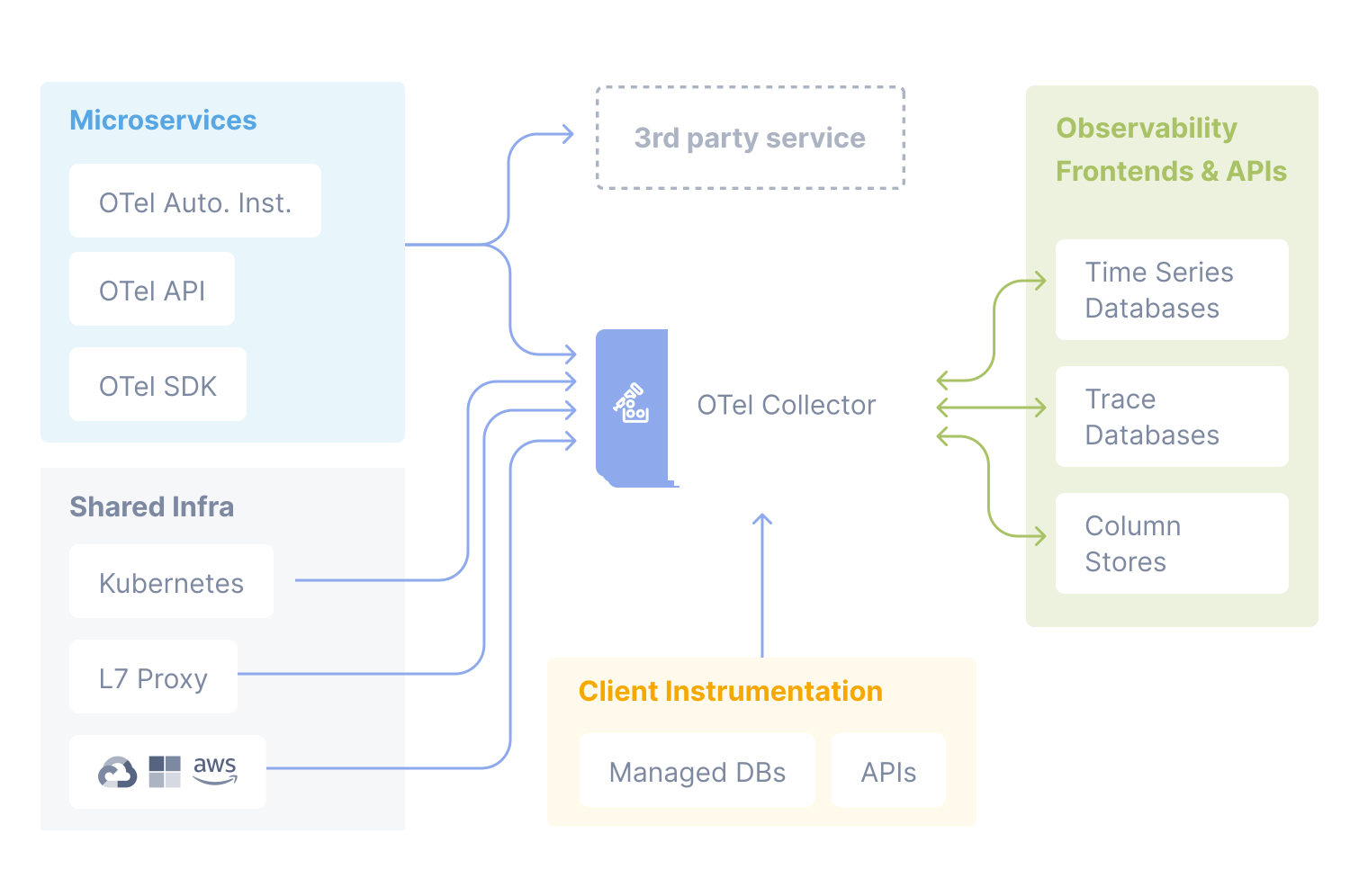
OpenTelemetry is a framework—a set of tools, APIs, and SDKs—for instrumenting your code and exporting telemetry data (logs, metrics, traces) to any backend of your choice. Key points:
It's open-source and vendor-neutral
It defines standard formats and protocols for telemetry
It provides language-specific libraries to instrument your services
It supports exporting data to many different backends like Prometheus, Jaeger, Grafana, or commercial platforms
With OpenTelemetry, you write your instrumentation once—and choose or change your backend later.
Why It Matters
OpenTelemetry Isn’t Just Another Framework — It’s an Observability Renaissance.
OpenTelemetry decouples how you collect data from where you send it. That flexibility:
Reduces vendor lock-in
Lowers maintenance overhead
Encourages consistent instrumentation across teams and services
In short, OpenTelemetry gives you control over your observability stack—without reinventing the wheel every time.The OpenTelemetry workflow...
Instrumentation
Before you can observe your system, your system needs to speak. That’s what instrumentation enables. Instrumentation is the process of preparing your application to generate telemetry like traces, metrics, and logs. Without instrumentation, there’s no data to collect, no issues to detect, and no insights to analyze.
Language Support
OpenTelemetry provides libraries in many major programming languages, including: Java, JavaScript, Go, Python, .NET, C++, Rust, Ruby, Swift, Elixir, and more
OTel began with traces, then expanded to support metrics and logs as well. At present the metrics are almost stable and logs are in experimental phase. However, you can always check for an updated status here.
Methods of Instrumentation
There are three common approaches to instrument your code with OpenTelemetry:
1. Automatic Instrumentation
No code changes needed.
Useful for common libraries, frameworks, and HTTP servers.
Ideal for getting quick visibility into systems.
2. Manual Instrumentation
Add OTel APIs directly into your application code.
You control what data is emitted, when, and how.
Useful for capturing business-specific metrics or tracing custom logic.
For example, in a microservices-based e-commerce app, you might manually instrument API calls to external payment gateways. You could track - Request latency, Error rates, Success rates and others. This helps pinpoint failures or performance issues in critical paths.
3. Library Instrumentation
Targets libraries your app depends on (e.g., database clients, messaging frameworks).
Adds tracing or metrics to internal operations.
For examplw, instrumenting a MySQL client lets you trace each database query, see how long it takes, and catch slow or failing operations.
The OpenTelemetry (OTel) Collector

Once your system is instrumented and emitting telemetry, the next question is: where does that data go? And more importantly, how do you manage it efficiently? This is where the Collector comes in.
The OTel Collector is a standalone service that acts as a bridge between your instrumented application and the final observability backend. It handles the collection, processing, and export of telemetry signals in a vendor-neutral and scalable way. It can receive telemetry from multiple sources, transform it as needed, and send it to one or more destinations.
Why Use a Collector?
While you can send telemetry data directly from apps to backends, using a collector provides clear benefits:
Scalability – handle high volumes of telemetry
Resilience – buffer and batch data to avoid loss
Flexibility – support many formats and destinations
Separation of concerns – decouple telemetry logic from application logic
You can also run multiple collectors for load balancing, high availability, or environment-specific use cases (e.g., staging vs. production).
Setting up the OTel Collector
Starting with OpenTelemetry Collector for your new system is a straightforward process that takes only a few steps:
Download the OTel Collector: Obtain the latest version from the official OpenTelemetry website or your preferred package manager.
Configure the OTel Collector: Edit the configuration file to define data sources and export destinations.
Run the OTel Collector: Start the Collector to begin collecting and processing telemetry data.
Core Components of the OTel Collector
1. Receivers
Receivers are the entry point to the OpenTelemetry Collector. They ingest telemetry data - logs, metrics, or traces from various sources. It decouple data collection from vendor tooling, reduce config overhead and enforce standard OTel formats. There are different types of receiver that supports a specific protocol or data format. This lets you pull in telemetry without hardwiring apps to observability backends.
receivers:
  # Data sources: logs
  fluentforward:
    endpoint: 0.0.0.0:8006

  # Data sources: metrics
  hostmetrics:
    scrapers:
      cpu:
      disk:
      filesystem:
      load:
      memory:
      network:
      process:
      processes:
      paging:

  # Data sources: traces
  jaeger:
    protocols:
      grpc:
        endpoint: 0.0.0.0:4317
      thrift_binary:
      thrift_compact:
      thrift_http:

  # Data sources: traces, metrics, logs
  kafka:
    protocol_version: 2.0.0

  # Data sources: traces, metrics
  opencensus:

  # Data sources: traces, metrics, logs
  otlp:
    protocols:
      grpc:
        endpoint: 0.0.0.0:4317
        tls:
          cert_file: cert.pem
          key_file: cert-key.pem
      http:
        endpoint: 0.0.0.0:4318

  # Data sources: metrics
  prometheus:
    config:
      scrape_configs:
        - job_name: otel-collector
          scrape_interval: 5s
          static_configs:
            - targets: [localhost:8888]

  # Data sources: traces
  zipkin:
OTLP ( OpenTelemetry Protocol), is a native receiver. It ingests telemetry data sent from OTel SDKs and agents over gRPC or HTTP formats.
Jaeger, Zipkin (tracing)
Prometheus (metrics)
Syslog, AWS CloudWatch, Kafka and more
Therefore, OTel Collector receivers centralize telemetry intake across systems. They handle multiple protocols and feed data into the pipeline in a standard format. This simplifies integration with backend tools - whether tracking with microservices or legacy systems. Receivers reduce complexity, enforce consistency and make your observability stack more maintainable.
2. Processors
processors:
  # Data sources: traces
  attributes:
    actions:
      - key: environment
        value: production
        action: insert
      - key: db.statement
        action: delete
      - key: email
        action: hash

  # Data sources: traces, metrics, logs
  batch:

  # Data sources: metrics, metrics, logs
  filter:
    error_mode: ignore
    traces:
      span:
        - 'attributes["container.name"] == "app_container_1"'
        - 'resource.attributes["host.name"] == "localhost"'
        - 'name == "app_3"'
      spanevent:
        - 'attributes["grpc"] == true'
        - 'IsMatch(name, ".*grpc.*")'
    metrics:
      metric:
        - 'name == "my.metric" and resource.attributes["my_label"] == "abc123"'
        - 'type == METRIC_DATA_TYPE_HISTOGRAM'
      datapoint:
        - 'metric.type == METRIC_DATA_TYPE_SUMMARY'
        - 'resource.attributes["service.name"] == "my_service_name"'
    logs:
      log_record:
        - 'IsMatch(body, ".*password.*")'
        - 'severity_number < SEVERITY_NUMBER_WARN'

  # Data sources: traces, metrics, logs
  memory_limiter:
    check_interval: 5s
    limit_mib: 4000
    spike_limit_mib: 500

  # Data sources: traces
  resource:
    attributes:
      - key: cloud.zone
        value: zone-1
        action: upsert
      - key: k8s.cluster.name
        from_attribute: k8s-cluster
        action: insert
      - key: redundant-attribute
        action: delete

  # Data sources: traces
  probabilistic_sampler:
    hash_seed: 22
    sampling_percentage: 15

  # Data sources: traces
  span:
    name:
      to_attributes:
        rules:
          - ^\/api\/v1\/document\/(?P<documentId>.*)\/update$
      from_attributes: [db.svc, operation]
      separator: '::'
Processors allow for fine-tuned control and optimization of your telemery data, before it’s exported. Common use cases:
Filtering – include or exclude data based on rules
Sampling – reduce volume by selecting representative traces or spans
Enrichment – add metadata or custom tags to enhance traceability
many more…
3. Exporters
exporters:
  # Data sources: traces, metrics, logs
  file:
    path: ./filename.json

  # Data sources: traces
  otlp/jaeger:
    endpoint: jaeger-server:4317
    tls:
      cert_file: cert.pem
      key_file: cert-key.pem

  # Data sources: traces, metrics, logs
  kafka:
    protocol_version: 2.0.0

  # Data sources: traces, metrics, logs
  # NOTE: Prior to v0.86.0 use `logging` instead of `debug`
  debug:
    verbosity: detailed

  # Data sources: traces, metrics
  opencensus:
    endpoint: otelcol2:55678

  # Data sources: traces, metrics, logs
  otlp:
    endpoint: otelcol2:4317
    tls:
      cert_file: cert.pem
      key_file: cert-key.pem

  # Data sources: traces, metrics
  otlphttp:
    endpoint: https://otlp.example.com:4318

  # Data sources: metrics
  prometheus:
    endpoint: 0.0.0.0:8889
    namespace: default

  # Data sources: metrics
  prometheusremotewrite:
    endpoint: http://prometheus.example.com:9411/api/prom/push
    # When using the official Prometheus (running via Docker)
    # endpoint: 'http://prometheus:9090/api/v1/write', add:
    # tls:
    #   insecure: true

  # Data sources: traces
  zipkin:
    endpoint: http://zipkin.example.com:9411/api/v2/spans
These send processed telemetry to observability vendors or storage systems. For example - Prometheus, Jaeger, Grafana, Datadog, New Relic, Honeycomb, Dynatrace, OpenSearch, SigNoz, and more
Exporters make it easy to integrate with any tooling ecosystem you use.
4. Extensions
extensions:
  health_check:
  pprof:
  zpages:
They help automate management tasks and improve observability of the collector itself. Extensions add non-telemetry features such as:
Health checks – verify collector is running
Service discovery – auto-detect sources
ZPages – serve live debug info via HTTP
Deployment Patterns for the OpenTelemetry Collector
The OpenTelemetry Collector is designed to be lightweight and flexible. It runs as a single binary and can be deployed in different ways based on system architecture, scale, and observability goals. Let’s explore some common deployment patterns.
1. Agent Pattern (Sidecar or DaemonSet)
The collector runs close to the application—either as a sidecar container (one per app) or as a DaemonSet (one per host).
Use Case
Local processing of telemetry
Minimal network hops before data leaves the node
Immediate enrichment or filtering near the source
Pros
Fine-grained control per service
Reduces network overhead between app and collector
Good for adding metadata specific to that node or pod
Cons
Harder to manage and scale in large environments
Complex configuration replication if many collectors run per host
2. Gateway Pattern (Centralized Collector)
Deploy a central collector or cluster of collectors. All services send their telemetry data here.
Use Case
Centralized processing and export
Simpler configuration management
Aggregation of telemetry from multiple sources
Pros
Easier to scale and manage centrally
Good for shared processing logic (e.g., sampling, batching)
Efficient backend integration
Cons
Adds a network hop between application and backend
Risk of bottleneck if not scaled properly
3. Hybrid Pattern (Agent + Gateway)
Use a two-layer approach:
Agent collectors run next to each app
A central gateway receives and exports processed data
Use Case
Large systems with different teams or domains
Complex data routing or multiple backends
Fine-tuned control over local + centralized processing
Pros
Best of both patterns: low latency local handling, centralized scaling
Supports layered processing: enrich locally, aggregate globally
Easier support for multi-tenant or multi-backend routing
Cons
More moving parts, more complex to configure
Requires careful tuning to avoid redundancy
4. Collector-as-a-Service
Collectors run as a hosted service, receiving data over public endpoints (e.g., from mobile clients or external systems), where direct access to internal systems is limited
Pros
Easy onboarding for external producers
No need to ship collector with every client
Cons
Less control over external environments
Security and rate limiting become important concerns
OpenTelemetry Collector is built with scalability and flexibility at its core. Its architecture supports horizontal scaling, allowing multiple collector instances to be deployed seamlessly across systems to handle increased telemetry workloads.
The configuration is highly customizable through easy-to-read YAML files, enabling dynamic setup of receivers, processors, and exporters to fit diverse environments.
So, whether running as a lightweight agent on individual hosts or as a centralized standalone service, the collector adapts effortlessly to different deployment needs, making it ideal for both small setups and large-scale distributed systems.
Closing Thoughts
We’ve reached a turning point in the way we build, manage, and scale observability systems. In the past, choosing an observability tool meant locking into a vendor, a protocol, and a language-specific SDK. Teams spent more time wiring systems together than actually solving problems. It was fragmented, expensive, and brittle. OpenTelemetry changed that everything.
Today, we have an open standard for collecting - traces, metrics, and logs, and exporting to multiple observability backends. It’s not just widely adopted—it’s becoming the default choice across the industry. What used to be a debate about which SDK to use is now no longer a question. Teams now start with OpenTelemetry.
This shift is powerful. Now vendors aren’t competing on proprietary SDKs anymore—they’re competing on what they can do with the data once it’s collected. They're focused on delivering better insights, richer visualizations, smarter alerting, and more cost-efficient observability platforms. That’s the real win. OpenTelemetry has democratized observability landscape by giving every team, a common language to instrument any system, in any environment. Hence, OpenTelemetry Isn’t Just Another Framework — It’s an Observability Renaissance.


